How to use the redundancy calculator
The calculator is a form and a payslip: you fill in Part A like the separation paperwork it imitates, and the payslip beside it rebuilds itself on every keystroke. This sheet walks through every field — what it means, where to find the number, and what it changes — using one worked scenario: $1,800 a week, 8 years of service, age 45. Every screenshot below is that scenario; open it and follow along.
§1What the tool does (30 seconds)
Four documents on a desk, chained together:
- Part A — Separation details. Your inputs. Everything else derives from this form.
- Final pay advice. A live payslip: NES redundancy weeks, notice, the tax-free amount, ETP and leave withholding, and the estimated net payment.
- Part B — Was it genuine? A 60-second check of the legal genuineness indicators, ending in a stamped RED / AMBER / GREEN outcome with the right links for each.
- Part C — Redundancy runway. How many months the net package replaces your take-home pay, and the Centrelink waiting period at the start of it.
Everything is an estimate of withholding under the published ATO schedules — not advice, and not your final assessed tax. Nothing you type leaves your browser.
§2Before you start: three numbers to gather
- Weekly base pay — from a recent payslip: ordinary hours × base rate. No overtime, penalties or allowances. Salaried? Annual base ÷ 52.
- Service and age — your start date (for continuous service, decimals fine) and your age on the dismissal date. Both change the tax treatment, sometimes dramatically.
- The dollars on the table — unused annual leave and long service leave balances in gross dollars (payslip or HR portal), and anything the employer is offering above the legal minimum.
§3Part A — the separation form, field by field
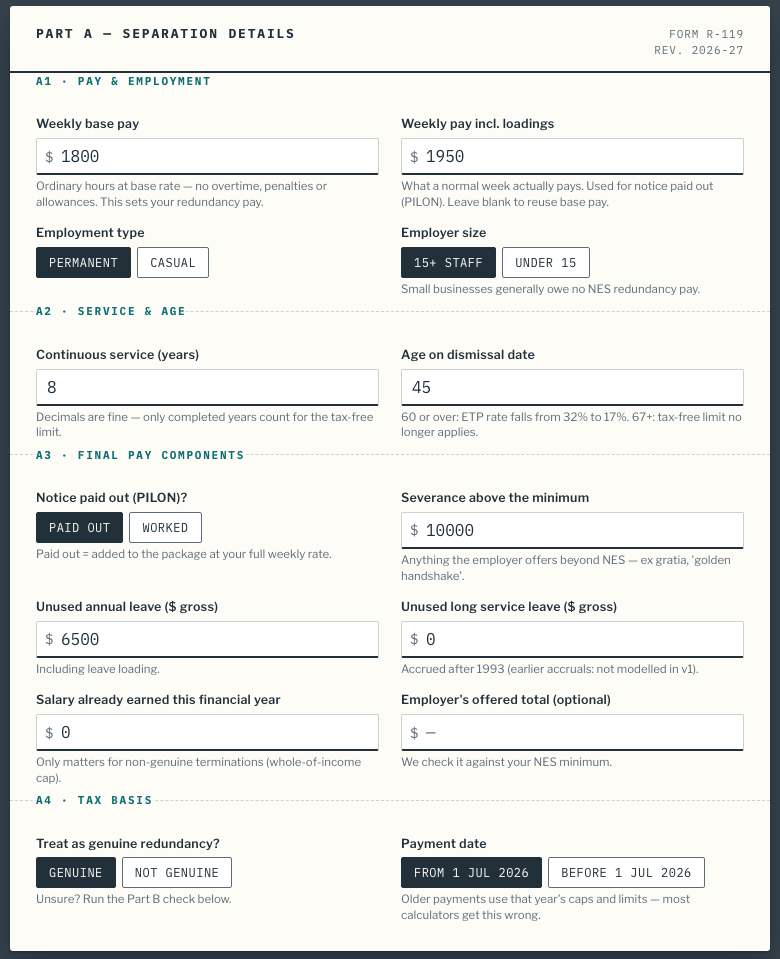
A1 · Pay & employment
- Weekly base pay — sets your redundancy pay: the s 119 weeks are multiplied by this figure. In the scenario, $1,800 × 14 weeks = $25,200.
- Weekly pay incl. loadings — what a normal week actually pays, used for notice paid out. Leave it blank to reuse base pay. Here $1,950 × 4 notice weeks = $7,800.
- Employment type — casuals get no NES redundancy pay; the calculator zeroes it and says so.
- Employer size — under 15 employees generally means no NES redundancy pay either (some awards override this).
A2 · Service & age
- Continuous service — decimals are fine; the law only counts completed years for the tax-free limit. 8 years → limit of $13,598 + 8 × $6,801 = $68,006.
- Age on dismissal date — under 60 the ETP rate is 32%; 60 or over it drops to 17%; at 67+ the tax-free limit no longer applies. Over 45 with 2+ years also adds a notice week.
A3 · Final pay components
- Notice paid out (PILON)? — "Paid out" adds the notice weeks to the package at your full weekly rate; "worked" leaves them out (you received them as normal salary).
- Severance above the minimum — anything beyond NES: ex gratia, a "golden handshake", extra weeks from an enterprise agreement.
- Unused annual leave / long service leave — gross dollars, including leave loading. These are taxed separately from the redundancy pool (32% flat on genuine redundancy).
- Salary already earned this financial year — only matters for non-genuine terminations, where the whole-of-income cap shrinks by it.
- Employer's offered total — optional. If the offer is below your NES minimum, the payslip flags a possible underpayment.
A4 · Tax basis
- Treat as genuine redundancy? — genuine gets the tax-free limit and flat leave rates; non-genuine loses both. Unsure? That's exactly what Part B is for.
- Payment date — payments before 1 July 2026 use the previous year's caps and limits. Most calculators silently apply the current year to everything; this one doesn't.
§4Reading your estimated final payslip
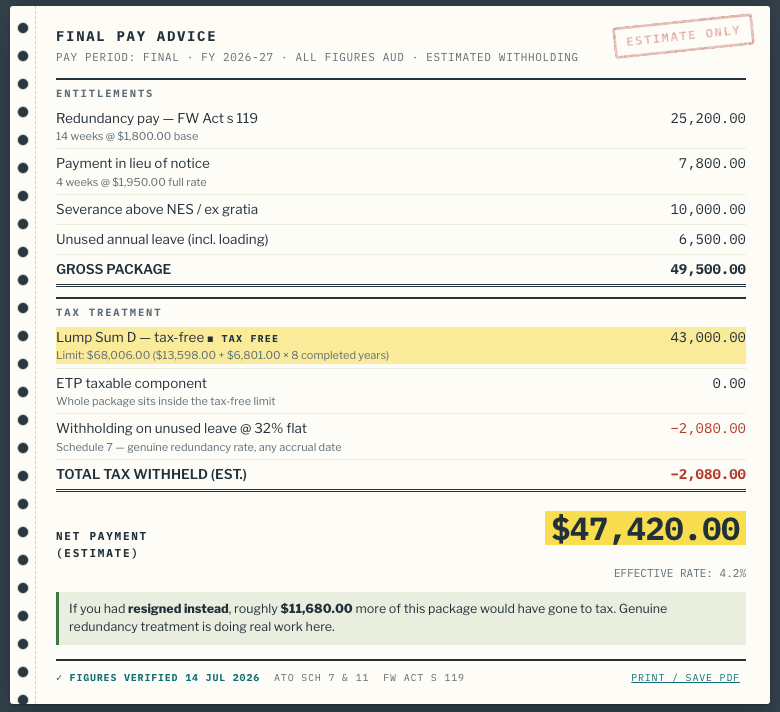
Read it top to bottom, like a real payslip:
- Entitlements — each component with its working shown: redundancy weeks × base pay, notice weeks × full pay, then your leave and severance figures, totalling the gross package.
- Tax treatment — the highlighted row is your tax-free amount (Lump Sum D) with the limit formula spelled out. Below it: the taxable ETP slice and its withholding rate, then leave withholding. Red negative amounts are money withheld.
- Net payment — the headline estimate, with the effective tax rate under it. In the scenario, only $2,080 of tax comes out of $49,500 — a 4.2% effective rate, because almost everything fits inside the tax-free limit.
- † footnotes — anything unusual about your inputs (small business, casual, over caps) appears here, stamped onto the slip.
- The resignation comparison — the green box quantifies what genuine-redundancy treatment is saving you versus quitting. If a restructure is coming, this is the number that says "don't resign yet."
§5Part B — the genuine-redundancy check
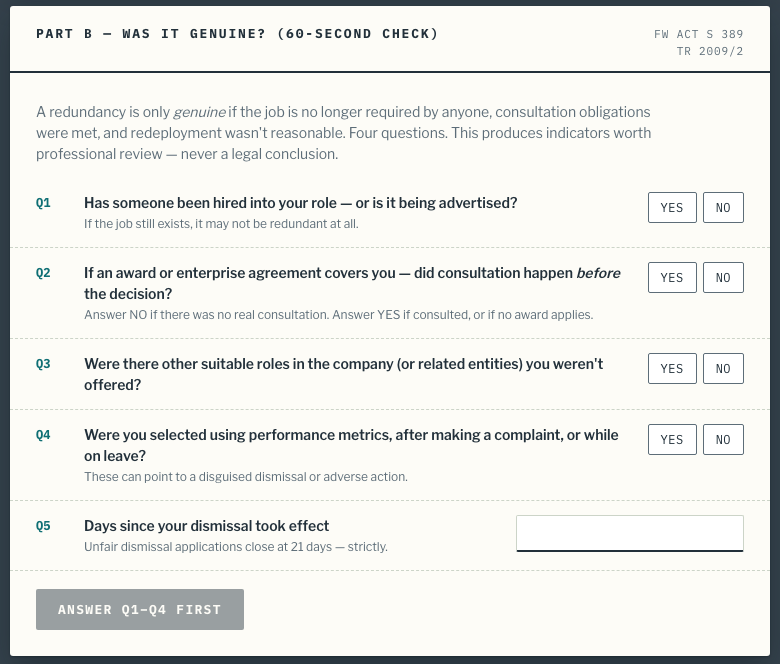
Answer the four questions honestly — they mirror the Fair Work Act s 389 test (job no longer required, consultation done, redeployment considered) plus a selection-motive check. Add the days since your dismissal took effect, then stamp the outcome:
- GREEN — no red flags. The tax settings you chose in A4 are probably right.
- AMBER — worth checking. Follow the Fair Work Ombudsman links; consider a free consult.
- RED — review urgently. The unfair-dismissal deadline is 21 days, applied strictly. The outcome box links to the FWC application page and offers a one-click "recalculate as non-genuine" so you can see the tax difference immediately.
The result is an indicator for professional review — never a legal conclusion.
§6Part C — the runway panel
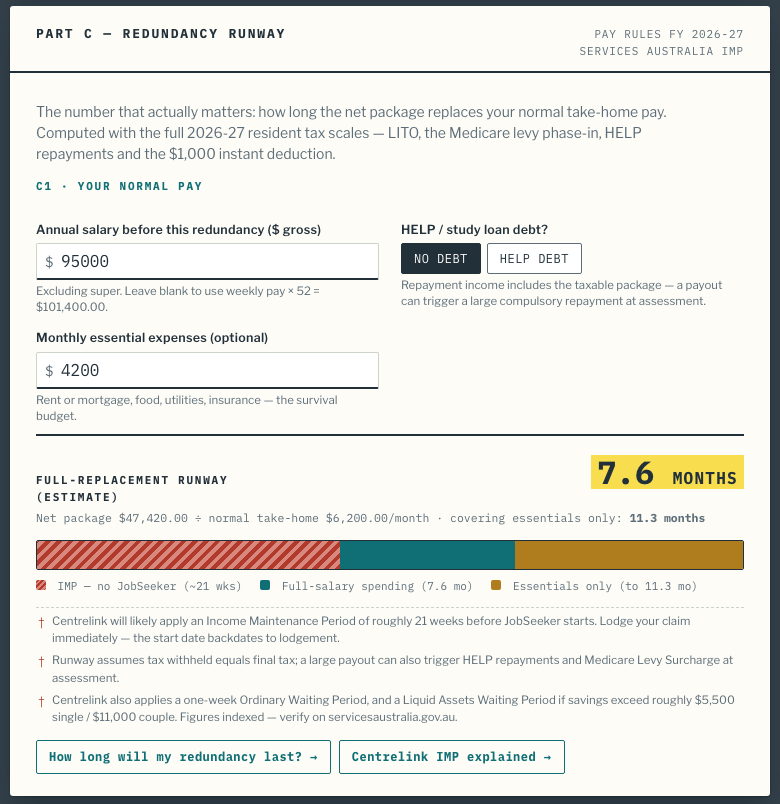
Three inputs, one headline number:
- Annual salary before this redundancy — pre-redundancy gross, excluding super. Leave blank and it uses weekly pay × 52.
- HELP / study loan debt — lowers your normal take-home (so the runway lengthens) but adds a warning: the taxable package counts as repayment income at assessment.
- Monthly essential expenses — optional. Adds the survival-budget runway: the same package covering only rent, food and bills.
The timeline bar is the whole story at a glance: the hatched red segment is the estimated CentrelinkIncome Maintenance Period (no JobSeeker), teal is full-salary spending, amber is the essentials-only tail. In the scenario the package replaces 7.6 months of take-home — but Centrelink would wait roughly 21 weeks, which is why the panel tells you to lodge your claim immediately. The two buttons underneath go deeper:the runway method andthe IMP explained.
§7Sharing, printing and privacy
- Every scenario is a URL. The address bar updates as you type — bookmark it, send it to your partner or adviser, and it reopens exactly as you left it.
- Print / save PDF — the link at the bottom of the payslip prints the payslip alone, clean, on white.
- Privacy — calculations run entirely in your browser; your figures are never sent to a server. Details in the privacy policy.
Frequently asked questions
Where do I find my weekly base pay?
On a recent payslip: it is your ordinary hours multiplied by your base hourly rate, before overtime, penalties, allowances or loadings. If you are salaried, divide your annual base salary by 52. Redundancy pay is calculated on this base figure, so leaving loadings out matters.
What if I don't know my exact years of continuous service?
Use your start date to the dismissal date, and enter decimals — 8 years and 6 months is 8.5. The calculator floors it where the law does: only completed years count for the tax-free limit and the s 119 weeks table.
Do I need to fill in every field?
No. The calculator starts with a complete example and recalculates on every keystroke. The only fields that matter for most people are weekly base pay, years of service, age, unused leave, and any severance above the minimum. Fields you leave at zero simply drop off the payslip.
Is anything I type sent to a server?
No. All calculations run in your browser. The inputs are reflected in the page address only so you can bookmark or share a scenario — nothing is transmitted or stored by us.
Can I save or print the result?
Yes. Use the "Print / save PDF" link at the bottom of the payslip — the print layout strips everything except the payslip itself. To save the whole scenario, copy the page URL: every input is encoded in it.
The payslip shows different numbers from my employer's letter. Who is wrong?
Possibly neither. The calculator shows the NES legal minimum plus your inputs, with estimated ATO withholding. Awards and enterprise agreements can pay more than the NES, and employers sometimes apportion the package differently. If the employer's total is below the NES minimum, the calculator flags it — that is worth professional advice.
Screenshots captured 17 Jul 2026 from the live FY 2026-27 calculator using theworked scenario. Figures and rules per thesource register. General information only, not tax, legal or financial advice.